HP ZBook Key Replacement: Firefly 14, Firefly 16, and Power 15
Replace a broken HP ZBook key by matching the Firefly or Power model, screen size, generation, and retainer clip. Start with the supported models below.
A missing letter key can interrupt work on an otherwise usable mobile workstation. If the damage is confined to a cap, retainer, or rubber cup, an individual replacement may be enough. A failed keyboard circuit or torn mounting point needs a different repair. This guide covers our listed ZBook Firefly 14 G7–G10, Firefly 16 G9–G10, and Power 15 G8–G10 models.
Can you replace one key on an HP ZBook?
Often, yes. A single-key repair is appropriate when the cap or hinge is damaged, the keyboard-base mounts are intact, and the keyboard otherwise works. A keycap replacement cannot correct a driver issue, liquid-damaged circuitry, or several keys failing together.
Identify Firefly or Power, size, and generation
“ZBook” alone is not enough to identify a replacement key. Record the complete model from the underside label or system information, including Firefly or Power, 14/15/16, and the G-number. Use the HP model identification guide if you cannot find those details.
Firefly 14 G8, Firefly 16 G9, and Power 15 G9 are separate model selections. Do not infer compatibility from the workstation branding or from a similar-looking key. If you have a Studio, Fury, or another model not shown here, ask us to confirm support rather than choosing a nearby name.
Find your supported ZBook replacement-key page
| Model family | Select your exact model and generation |
|---|---|
| Firefly 14 | Firefly 14 G7 · Firefly 14 G8 · Firefly 14 G9 · Firefly 14 G10 |
| Firefly 16 | Firefly 16 G9 · Firefly 16 G10 |
| Power 15 | Power 15 G8 · Power 15 G9 · Power 15 G10 |
Each link opens the corresponding catalog page. Compare the keyboard image and any clip options, then check availability for your exact key. For the full list, use the HP ZBook replacement-key catalog.
Compare the retainer under the key
The retainer is the small moving hinge below the cap. Its attachment points must match the cap and keyboard base. These ZBook listings offer multiple retainer options, so the model name is the starting point rather than the final compatibility check.
The two catalog reference photos below illustrate why a top view of the keycap is insufficient. These are the two styles shown for the listed Firefly 14 models; they are not a compatibility chart for every ZBook. Compare the photo for the same key size: a letter key, wide key, and function-row key can have different mechanisms.
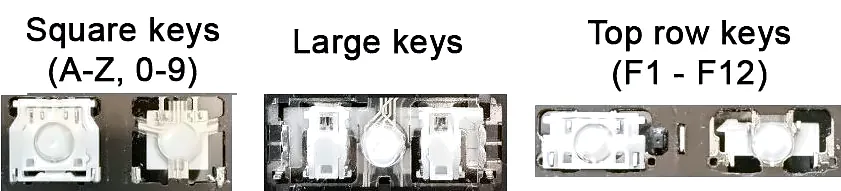
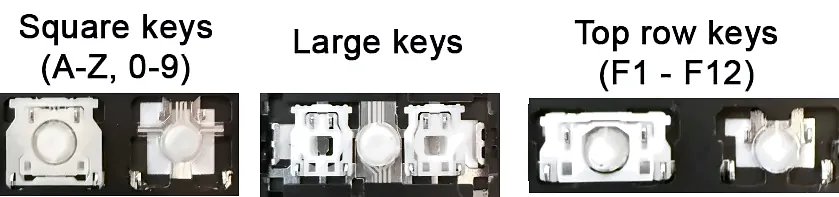
Use the options on your own model page for the final match. If the cap is already loose, photograph its underside and the exposed key area. Do not remove a working neighboring key for comparison. The retainer clip guide explains the parts, and our support team can help identify them from photos.
Which damage can a replacement kit address?
- Missing or cracked cap: inspect the remaining mechanism and mounts before choosing the exact replacement.
- Key tilts or pops off: check the underside hooks and retainer pivots for damage.
- Key does not spring back: inspect for obstruction, a damaged hinge, or a displaced rubber cup.
- Normal movement but no input: test another application and investigate the keyboard fault before buying plastic parts.
Multiple failed keys after a spill or torn metal mounting points can make an individual-key kit unsuitable. A new cap will not restore the keyboard's electrical contacts or rebuild its base.
Match backlighting and the exact key position
Check the keyboard's actual configuration and the options offered in the selector. A backlight that is switched off or faulty does not prove the keyboard is non-backlit. Compare the model information and existing caps; see the backlit key matching guide if uncertain.
Select the precise key position, including left versus right modifiers. Space Bar, Shift, and Enter can use stabilizer hardware. Follow the matching installation instructions, power down before working on the mechanism, and stop if a part will not align without force.
Are Firefly and Power keys interchangeable?
Do not assume so. Match the full model, generation, layout, key position, and retainer. Even within a listed model, different clip options may be offered.
What should I send if I need help matching a ZBook key?
Send the full model name, the key you need, a clear photo of the exposed key area, and the underside of the cap if available. Include the keyboard layout and whether it is backlit. Ask us to confirm the match, or choose your ZBook model to begin.